Evaluating WhatConverts Lead Tracking for Modern Marketing
Maintaining operational clarity across campaigns demands precise attribution and verifiable lead intelligence. For agencies and growth-focused businesses, knowing exactly which touchpoints drive phone inquiries, chat sessions, or online form completions is essential. This is where WhatConverts lead tracking enters the landscape as a dedicated attribution platform designed by marketers to tie incoming inquiries directly to marketing spend.
This article contains affiliate links; The FitSil Edit may earn a commission if you make a purchase, at no extra cost to you. Readers assessing attribution platforms can evaluate the software directly through WhatConverts to review its data dashboards firsthand.
The FitSil Edit’s take: WhatConverts suits marketing agencies, franchises, and multi-channel businesses that need to track incoming phone calls, online forms, and chats back to specific campaigns while eliminating unqualified leads and exporting clean data directly into their CRM.
Core Capabilities of WhatConverts Lead Tracking
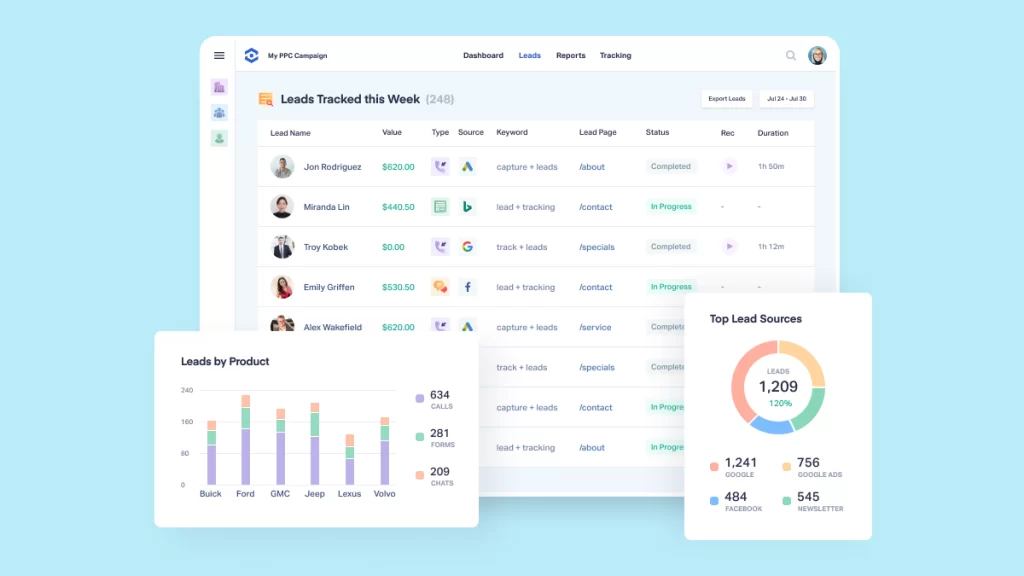
The platform brings disparate conversion channels into an orderly, centralized dashboard. Rather than relying on separate reporting mechanisms for every channel, WhatConverts captures call tracking, form tracking, chat tracking, and e-commerce transactions in one location. This structure enables practitioners to trace each incoming interaction back to specific marketing campaigns and traffic sources.
Lead organization extends beyond straightforward intake. Users can search and filter entries by name, telephone number, or email address. The dashboard allows teams to qualify leads and eliminate junk leads with a single click, ensuring conversion metrics reflect authentic customer interest rather than administrative clutter. Teams can also assign values to individual leads to clarify return on investment and export records directly into their preferred CRM.
For additional curated perspectives on digital tools and operational workflows, explore our coverage across The FitSil Edit.
Multi-Channel Visibility and Ecosystem Integrations
Reporting features are segmented into marketing summaries, custom report builders, marketing intelligence tools, and real-time reporting features that allow marketing departments to share conversion data promptly with sales personnel. By presenting verified lead data, teams can illustrate campaign performance using clear business outcomes.
Connecting attribution software to existing workflows is equally critical. The service supports over 1000 integrations, facilitating seamless connections across the broader technology stack. Featured integrations include advertising channels such as Google Ads, Bing Ads, and Facebook Ads, alongside tools like Calendly, AgencyAnalytics, Pipedrive, SimpleTexting, VWO, Intercom, Formsite, Formstack, and Landingi. A developer API is also provided for bespoke data configurations.
Teams reviewing potential workflow synergies can inspect the official WhatConverts platform details to verify software compatibility before deployment.
Before You Buy
A considered adoption requires aligning platform functionality with your organization’s day-to-day conversion channels. WhatConverts provides access through a 14-day free trial and a 10-minute demo video alongside scheduled live demonstrations. The software addresses use cases across diverse sectors, including real estate, legal practices, automotive dealerships, hospitality, finance, and medical environments where separating new patient calls from existing inquiries is paramount.
Before implementing the software, teams should verify which tracking methods—phone numbers, embedded forms, or live chat widgets—match their existing web assets. Reviewing routing architecture, team access permissions, and CRM data field mappings during the trial period will ensure an orderly onboarding process.
Final Considerations on Attribution
Selecting an attribution system depends entirely on campaign complexity and reporting demands. By combining multi-channel capture with one-click lead qualification, WhatConverts lead tracking provides verifiable insight into which campaigns generate actual inquiries. Evaluating its features during a trial run will determine whether its reporting depth matches your organization’s analytical standards.
Leave a Reply